Releases & Deployments
The following GCP projects are involved:
- deepdesk-cloud: Central project where all Pull Request (PR) and build jobs are run
- deepdesk-nl-staging: Staging projects where the latest changes are deployed
deepdesk-<region>: Production projects, where official releases are deployed
We make use of GitOps for our deployments, which means we use a special Git repository, in our case called deepdesk-config, that contains the configuration of each deployment, including which version is deployed.
Release workflow
This flowchart describes what happens when a developer pushes a commit to one of the 'services' repo's (like engine, backend, etc.).
Some steps require a bit more explanation:
- The ImageReflector controller monitors GCR and get the latest tags for all images in the deepdesk-cloud repository. Image tags have to be 'sortable' for this to work, so we chose to go with the proposed format of flux
main-<commit id>-<unix timestamp>. The Reflector passes the list of images and tags to the ImageAutomation controller - The ImageAutomation controller checks out a copy of the deepdesk-config repo and looks for special tags in the comments of all the files
{"$imagepolicy": "flux-system:backend-staging:tag"}. It updates the tags with the version found in the container registry and pushes an update to Github. - The push to deepdesk-config causes the HelmController to re-package the helm chart, update the configuration values and deploy the chart to GKE.
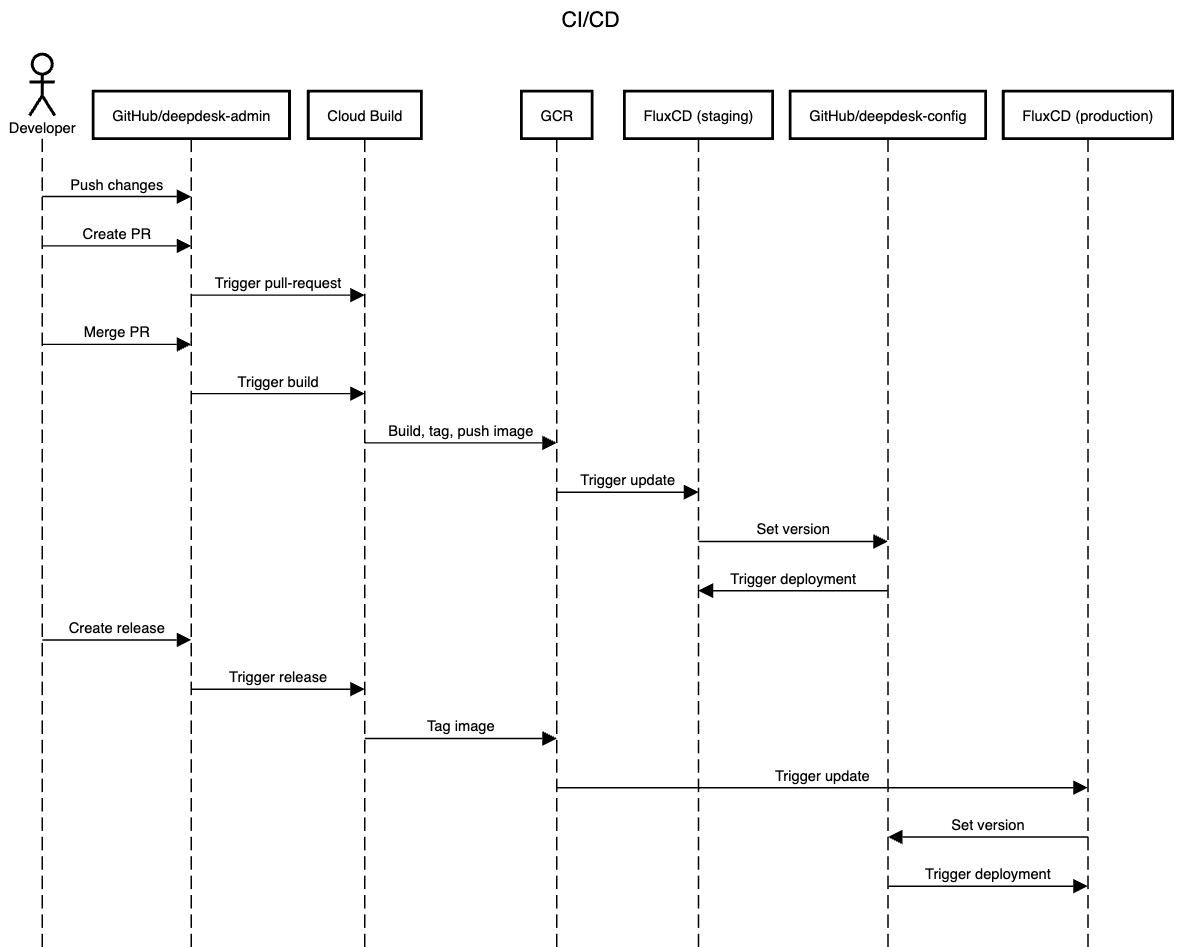
The Cloud Build jobs are defined in triggers, which specify when to run, and which build config file to use. These config files are usually in a cloudbuild or .cloudbuild folder, for instance deepdesk-admin/.cloudbuild/main.yaml.
Versioning
For the versioning of releases, we use Semantic Versioning, together with Conventional Commits.
- Releases containing breaking change commits (
feat!:orBREAKING CHANGEin description) get a major bump. - Releases containing new feature commits (
feat:) get a minor bump. - Release containing fixes and chores (
fix:,chore:) get a patch bump.
Release candidates / UAT
The CI system support releasing a release candidate only to "UAT" accounts. Such accounts are marked as is_uat in onboarding and admin. When a Github release is created that has a pre-release suffix (like v2.0.0-rc.1), it will only be deployed to accounts marked as UAT. This allows customers to test a new release before we release it to production.
Once the release is found to be OK, a new release can be created without the pre-release suffix and a higher semver version number than the pre-release (so v2.0.0-rc.1 becomes v2.0.0 ). A 'prod' release will be deployed to both UAT and production accounts.
Hotfixes
If a change needs to be applied in production, while the main branch has already received new commits that are not production ready, we need to 'hot fix' production:
-
Create a release branch from the current production tag
v1.42.1:git checkout -b release-v1.42.2[-some-optional-context] -
Apply and commit changes on this branch. Commits on
release-.*trigger the same job asmaincommits, and will build and tag a new image. -
Create a new release tag on the release branch (will trigger deployment)
v1.42.2
Don't forget to merge changes in the release branch to the main branch
Rolling back
To roll back a deployment to a previous version, delete the new version from Artifact Registry (or ask a Release Approver to do this for you). You will have to manually rebuild that version to deploy it again, or save a backup and restore it later.
Never reuse previous tags for newer builds, since images are cached locally in GKE
To generate the sequence diagram above, copy paste the following code to https://sequencediagram.org