DevOps for Developers
How To Guides
Prerequisite — Connecting to the staging cluster
- Go to the Kubernetes Engine "console" via browser: https://console.cloud.google.com/kubernetes
- Select the project you're interested in from the
Projectsdrop down (top-left of screen), in this casedeepdesk-nl-staging. You will now see the clusters available under that project. We're interested indeepdesk-services-v1 - Navigate into that cluster, and once in, there's a
Connectbutton, which once clicked gives you the command you need to run on your local so that you get the credentials for the cluster on your local system:
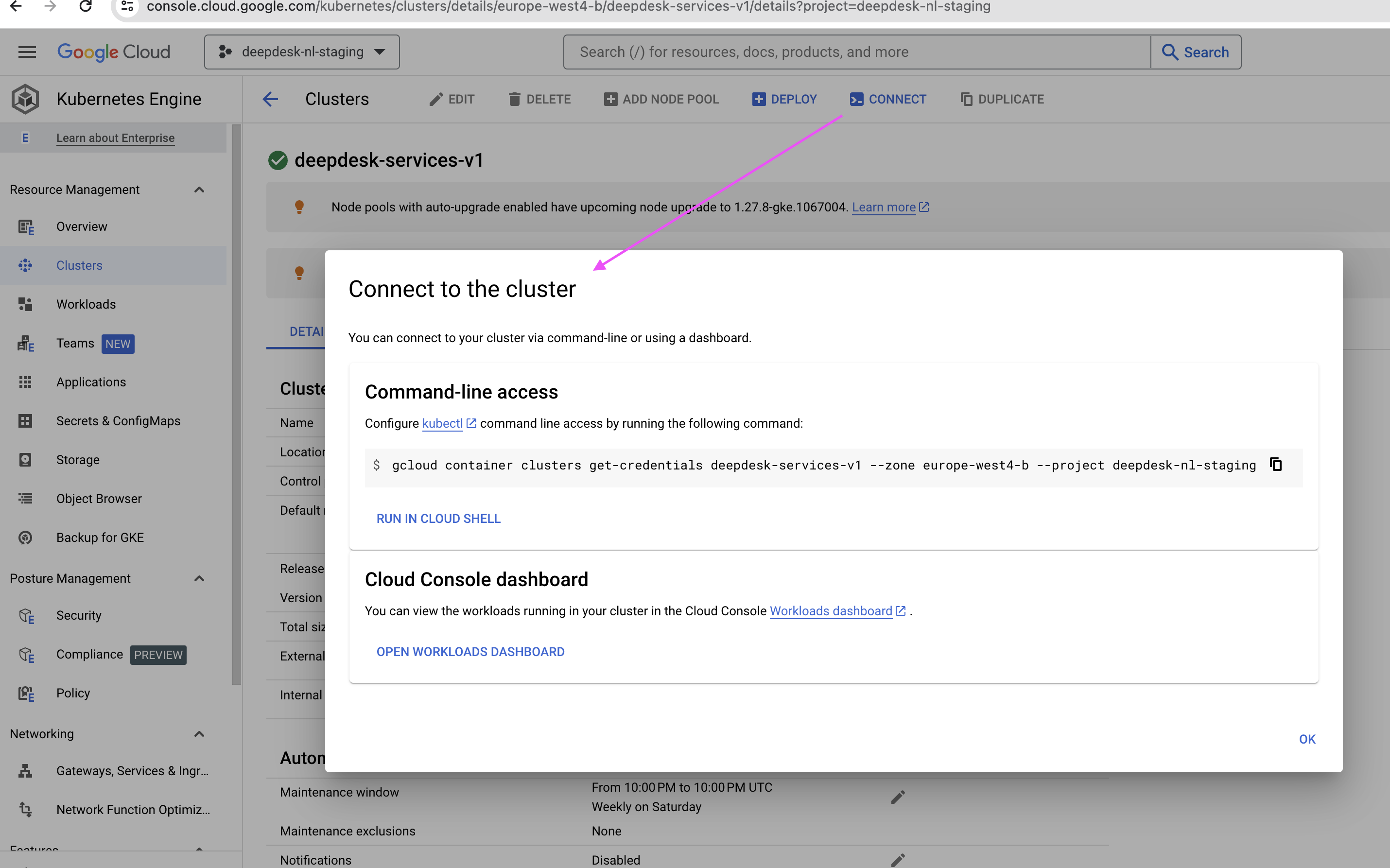
Run the command locally:
$ gcloud container clusters get-credentials deepdesk-services-v1 --zone europe-west4-b --project deepdesk-nl-staging
Fetching cluster endpoint and auth data.
kubeconfig entry generated for deepdesk-services-v1.
What does it do? It writes to ~/.kube/config
This stores config information about all the clusters, settings and certificates your local environment needs to access those clusters.
Other tools used in "how to's" below:
- kubectl comes with the K8S installation.
- kubectx (installed via homebrew on Mac OSX), which should include
kubens. Docs here.
Get the names of all pods under an account/namespace
$ kubectl get pod
NAME                                             READY   STATUS      RESTARTS   AGE
admin-867978d7b-gdv69                            5/5     Running     0          5h36m
admin-celery-worker-67f74c6778-vdt5g             3/3     Running     0          5h36m
anonymizer-86cb46d649-rwvzn                      2/2     Running     0          5h36m
backend-54986968cb-vr258                         3/3     Running     0          5h36m
engine-acme-968946cff-8vwhd                      3/3     Running     0          5h36m
gpt-acme-69cc6f894d-ztw6g                        2/2     Running     0          5h36m
knowledge-search-6f8cfdbfd4-t8skg                2/2     Running     0          5h36m
knowledge-search-celery-worker-b7659b46b-98s7w   2/2     Running     0          5h36m
llm-gateway-59dcc95d4f-k2grd                     2/2     Running     0          5h36m
ner-656dcbc6bf-mdwrk                             2/2     Running     0          5h36m
redis-54df649c44-mhvh5                           2/2     Running     0          5h36m
retention-28525020-smnpw                         0/4     Completed   0          11h
summarizer-786fd5bb97-rctfq                      2/2     Running     0          5h36m
tensorflow-bd47c7768-dqvpk                       2/2     Running     0          5h36m
trigger-engine-8957959fc-czzh5                   3/3     Running     0          5h36m
Run Django manage.py commands inside/against an admin pod
-
Go to the right cluster, in the case of staging:
$ kubectx gke_deepdesk-nl-staging_europe-west4-b_deepdesk-services-v1N.B. Switching cluster applies for the whole machine you're working on, not just the current shell session.
-
Then, since every account has its own namespace, to go to the right account, for example
acme:$ kubens acme -
Get the pod you want connect to:
$ kubectl get pod
NAME                                             READY   STATUS      RESTARTS      AGE
admin-867978d7b-tzvzm                            5/5     Running     0             4h3m
admin-celery-worker-67f74c6778-ggsdv             3/3     Running     0             4h3m
anonymizer-86cb46d649-bssts                      2/2     Running     1 (10h ago)   10h
backend-54986968cb-922tl                         3/3     Running     0             10h
engine-acme-968946cff-jdbdr                      3/3     Running     0             10h
gpt-acme-69cc6f894d-fdhb5                        2/2     Running     0             10h
knowledge-search-6f8cfdbfd4-9s5ws                2/2     Running     0             10h
knowledge-search-celery-worker-b7659b46b-6c88w   2/2     Running     0             10h
llm-gateway-59dcc95d4f-7zghg                     2/2     Running     0             10h
ner-656dcbc6bf-hfzm4                             2/2     Running     0             10h
redis-54df649c44-6zp4n                           2/2     Running     0             10h
retention-28523580-kwp9z                         0/4     Completed   0             15h
summarizer-786fd5bb97-svj5f                      2/2     Running     0             6h6m
tensorflow-bd47c7768-66kmr                       2/2     Running     0             10h
trigger-engine-8957959fc-8kkvm 3/3 Running 0 10h -
So the admin pod is
admin-867978d7b-tzvzm. You can connect to it usingbash:kubectl exec -it admin-867978d7b-tzvzm -- bashYou can run any
manage.pycommand in there.Or else you can run it without entering a shell session this way:
$ kubectl exec -it admin-867978d7b-tzvzm -- python manage.py showmigrations
Run Django manage.py commands against a set of admin pods
You can do this by creating an executable shell script that "loops" to run a command across all admin pods:
#!/bin/bash
while IFS= read -r line
do
  ns=$(echo "$line" | awk '{print $1}')
  pod=$(echo "$line" | awk '{print $2}')
  echo $ns $pod
  kubectl exec -n $ns deployment/$pod -- python manage.py seed_appsearch
done < <(kubectl get deployment -A | grep admin | grep -v celery)
The below questions explain this script.
What does the script run?
In the example above manage.py seed_appsearch is the Django management command run across all admin pods, but you can replace this with runscript from django-extensions package to run scripts, or any other Django command such as showmigrations .
This can be parameterised, but that's outside this article's scope.
How does the script work? What does the while loop iterate on?
To explain this we have to start from the end. Specifically this statement:
kubectl get deployment -A | grep admin | grep -v celery
This statement lists all admin pods under all accounts; grep -v celery excludes pods with label admin-celery-worker:
$ kubectl get deployment -A | grep admin | grep -v celery
acme                          admin                                                            1/1     1            1           65d
anywhere365                   admin                                                            1/1     1            1           474d
clarabridge                   admin                                                            1/1     1            1           474d
coosto                        admin                                                            1/1     1            1           474d
e2e                           admin                                                            1/1     1            1           181d
genesys                       admin                                                            1/1     1            1           474d
liveengage                    admin                                                            1/1     1            1           474d
ringcentral                   admin                                                            1/1     1            1           12d
salesforce                    admin                                                            1/1     1            1           474d
testtracebuzz                 admin                                                            1/1     1            1           474d
The while loop therefore loops over each line, and the lines within the loop use the first item in the table, separating the table's "cells" using spaces.
Finally kubectl exec -n $ns deployment/$pod -- python manage.py seed_appsearch executes python manage.py seed_appsearch against each pod.
Port forwarding admin to service your localhost
$ kubectl port-forward services/admin 8080:80
Forwarding from 127.0.0.1:8080 -> 8080
Forwarding from [::1]:8080 -> 8080
In this context the "service" is a Kubernetes service.
Open your browser at http://localhost:8080/admin/ and you can access staging admin (for the currently active cluster) from your localhost.
Connect to admin staging database via psql
This consists of two parts:
Part 1 - Port forward admin staging postgres to your local 5432 port
As when forwarding port 80 for Nginx, this time we forward the Postgres 5432 port:
$ kubectl port-forward admin-867978d7b-gdv69 5432:5432
Forwarding from 127.0.0.1:5432 -> 5432
Forwarding from [::1]:5432 -> 5432
Notice how in this case, since the service does not expose port 5432, we had to use the pod directly, in the above example admin-867978d7b-gdv69 to port forward the pod's 5432 port to our localhost's 5432 port.
To get the list of pods, use kubectl get pod as shown above.
Part 2 - Connect via psql
We need the database connection string for psql. How to get that?
First, get the Kubernetes secret from admin-secrets:
$ kubectl get secret admin-secrets
NAME            TYPE     DATA   AGE
admin-secrets   Opaque   14     65d
Print it in yaml format:
$ kubectl get secret admin-secrets -o yaml
apiVersion: v1
data:
  key1: value1
  key2: value2
  DATABASE_URL: <encoded value>
  ...
  keyN: valueN
immutable: false
kind: Secret
metadata:
  ...
type: Opaque
Copy the value of DATABASE_URL decode it:
$ echo <encoded value> | base64 -d
This should print the value of DATABASE_URL in the format of:
postgres://acme-admin:<password>@localhost:5432/acme-admin
Copy the decoded DATABASE_URL and run psql with that database connection:
$ psql postgres://acme-admin:<password>@localhost:5432/acme-admin
psql (14.10 (Homebrew))
Type "help" for help.

acme-admin=> SELECT COUNT(*) from dashboard_customuser;
 count
-------
    32
(1 row)

acme-admin=>
How to inspect secrets
To list the secrets of a service:
kubectl get secret
To list the contents of a secret resource:
kubectl get secret admin-secrets -ojsonpath='{.data}'
To inspect the secret value:
kubectl get secret admin-secrets -ojsonpath='{.data.APPSEARCH_API_KEY}' | base64 -d
What to do when secrets are not in sync with Secret Manager
Some secrets are synced from Secret Manager using external-secrets. Most are synced every 10 minutes, except Admin. The reason being that updating the admin secret will constantly reload nginx (it uses the apikey secret in a route), which causes connection drops / 502 / etc.
> kubectl get externalsecret
NAME                          STORE                  REFRESH INTERVAL   STATUS         READY
admin-secrets                 project-secret-store   0                  SecretSynced   True
backend-secrets               project-secret-store   10m0s              SecretSynced   True
engine-secrets-boluat-voice   project-secret-store   10m0s              SecretSynced   True
engine-secrets-default        project-secret-store   10m0s              SecretSynced   True
gpt-secrets                   shared-secret-store    10m0s              SecretSynced   True
knowledge-search-secrets      project-secret-store   10m0s              SecretSynced   True
llm-gateway-secrets           project-secret-store   10m0s              SecretSynced   True
ner-secrets                   shared-secret-store    10m0s              SecretSynced   True
redis-secrets                 project-secret-store   10m0s              SecretSynced   True
slack-webhook                 shared-secret-store    10m0s              SecretSynced   True
summarizer-secrets            project-secret-store   10m0s              SecretSynced   True
trigger-engine-secrets        shared-secret-store    10m0s              SecretSynced   True
To manually sync secrets, annotate the resource:
kubectl annotate externalsecret admin-secrets force-sync=$(date +%s) --overwrite
How to restart a service?
Example:
kubectl rollout restart deployments/admin -n ringcentral
Resources
Ronald's walkthrough video in which the above how to's are demonstrated:
https://drive.google.com/file/d/1C1S-6M72RQYv1t1YJfAr9bVKQpPK18Ar/view
Aliases used by Ronald in video above:
# Kubectl
alias k=kubectl
alias kc=kubectx
alias kn=kubens
alias pods='kubectl get pods -A -o wide'
alias pod='kubectl get pods -o wide'
Pending Questions
- Question by Joseph. What can a developer do when the staging container doesn't start? How to debug it? Assuming local image behaves differently. In this specific case staging instance was being restarted but
kubectl get podcommand above showedstatuscrash loop backoff- At no point I was able to log into it and inspect it.